
BLOG · Open Banking
How Pay by Bank works: every screen your customer sees
The five steps of a Pay by Bank payment, what the customer sees at each one, which screens you control, and what “pending” really means.
Before adding a new way to pay, most teams ask the same thing: will our customers manage it? The fastest way to answer is to understand how Pay by Bank works from the customer’s side, screen by screen, including the parts you don’t control.
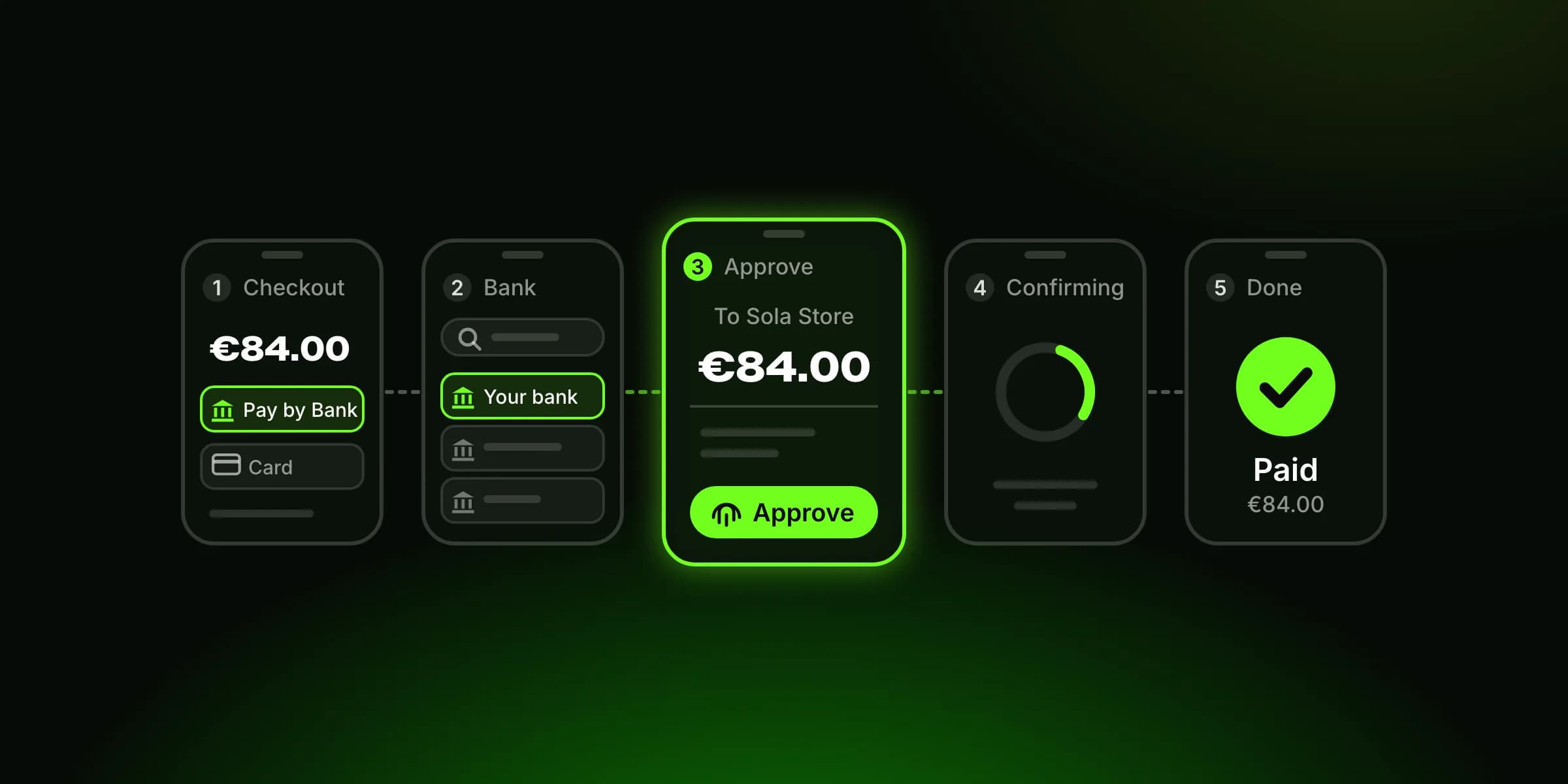
Here is the whole payment in five steps:
The customer chooses Pay by Bank at your checkout.
They pick their bank from a searchable list.
They’re handed to their bank: the banking app on a phone, or the bank’s website or a phone approval on a desktop.
They approve the payment in the bank, with a fingerprint, face or PIN, seeing the amount and who they’re paying.
They come back to your checkout, where the payment shows as successful, pending or failed.
No card number and no IBAN to type: the money comes from the customer’s bank account, not a card. Below is what each step looks like, where it can stall, and which of those screens are yours to design.
Step 1: the customer chooses Pay by Bank
The first screen is yours. Pay by Bank appears as a payment method next to cards and anything else you offer, with the order total above it.
Two choices here shape everything after. Where it sits: show it at the same level as cards, not under “more options”, where fewer customers will look. What it’s called: use one name everywhere (checkout, product pages, confirmation emails). “Pay by Bank” is a common one, and consistency saves a moment of doubt.
A single line under the button helps more than it looks: “You’ll approve the payment in your banking app.” People hesitate when they don’t know what happens after the click.
Step 2: picking the bank
Next the customer chooses their bank from a list. A good list is searchable by name, starts with the country already set, and puts the most-used banks first. Sola’s list is searchable by name and remembers the bank a customer used last time, so a returning customer skips this step and goes straight to approval.
This is the step where some customers stall: they can’t find their bank, or they aren’t sure their bank supports it. Search that tolerates spelling and short names (“ING”, “Sparkasse”) matters more than a long scroll of logos.
Step 3: into the banking app, or onto the phone
What happens next depends on the device.
On a phone, the customer is handed straight to their banking app (app-to-app), and comes back to your site or app once they’ve approved. The European Banking Authority has said that when the customer starts in a merchant’s or provider’s app and their banking app is installed, they should go straight to it, without detours through the bank’s mobile website, and be returned automatically afterwards, without having to reopen the app by hand (EBA Opinion EBA/OP/2020/10). If the app isn’t installed, the bank’s mobile website takes over.
On a desktop, there are a few patterns, and which one the customer sees depends on the bank and the scheme. Some banks show their own website login in the browser. Others send an approval request to the banking app on the customer’s phone and wait for it. A few schemes show a QR code that the customer scans with their banking app, the way the Dutch iDEAL scheme describes its QR flow. Either way, the approval itself happens with the bank.
Step 4: approving inside the bank
This screen belongs to the bank. The customer logs in or opens the app, sees the payment details and approves.
Two rules sit behind it. Under PSD2’s strong customer authentication rules, and unless the bank applies one of the narrow exemptions they allow, the approval uses two of three independent factors: something only the customer knows (a PIN), has (their phone) or is (a fingerprint or face). And under the technical standard for authentication, Delegated Regulation (EU) 2018/389, the customer must be shown the amount and who they’re paying, with the approval tied to exactly that amount and payee. Change either, and the approval no longer works.
You can’t restyle this screen, and neither can your payment provider. What the EBA does expect of banks is that they don’t add unnecessary steps to a payment started by a provider: a second authentication for one payment when the provider has sent the full payment details, a screen the bank’s own login doesn’t have, or asking the customer to type their IBAN.
With Sola, the customer’s banking login never reaches you or us: authentication happens entirely between the customer and their own bank. And under PSD2, the provider that starts the payment (a payment initiation service provider) may never hold the customer’s money, and may not store sensitive payment data such as their security credentials.
Step 5: back at checkout, success, pending or failed
The customer returns to your confirmation page, and the payment is in one of three states.
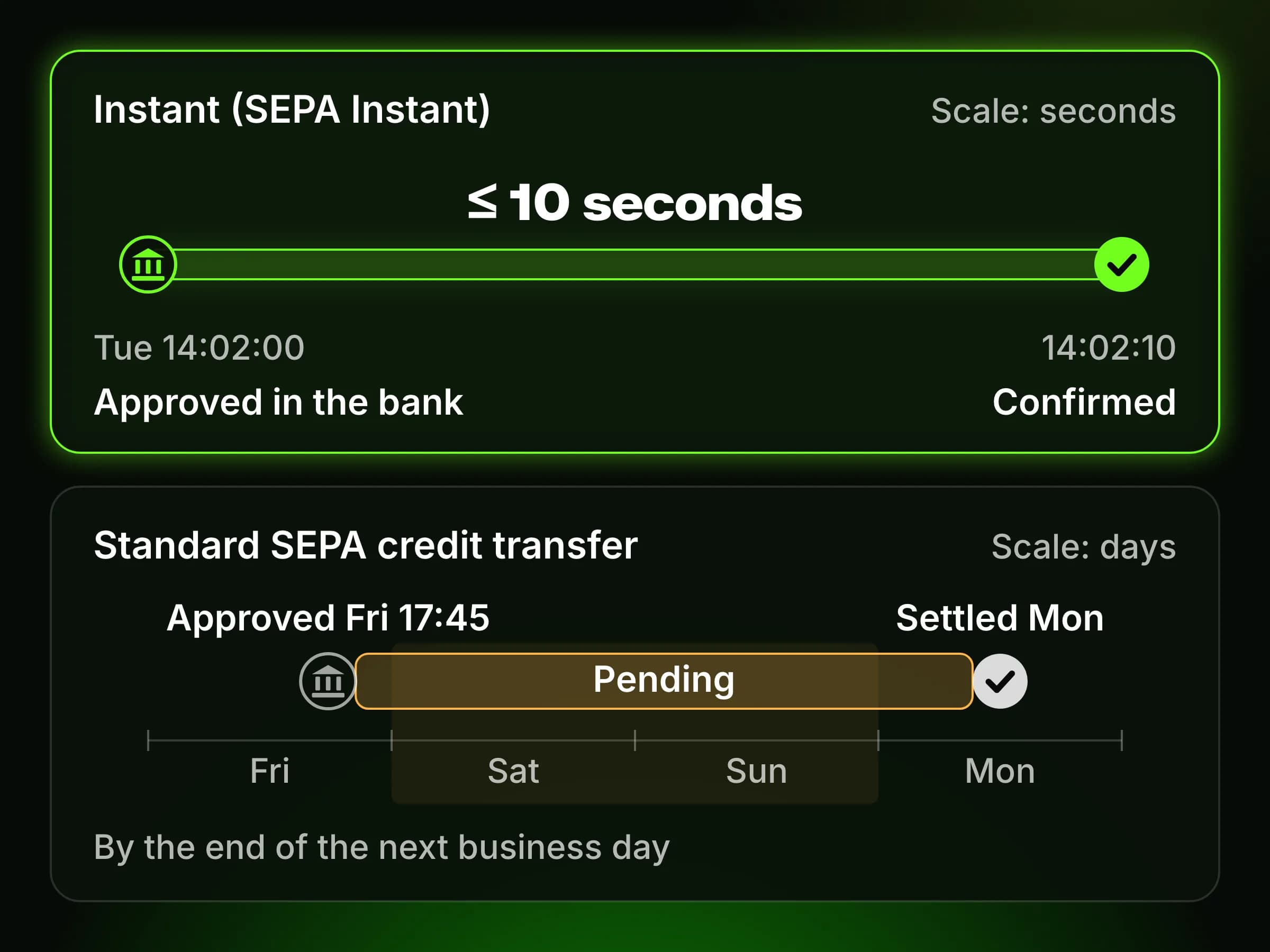
Successful is what you want: the money has been confirmed. With SEPA Instant, the bank-to-bank transfer has to complete within 10 seconds, at any hour, any day of the year, and euro-area banks have had to be able to send instant payments since 9 October 2025 under the Instant Payments Regulation.
Failed covers more than a refusal: the customer may have cancelled in the app, let the session time out, or had the payment rejected by their bank.
Pending is the one that needs explaining, because “accepted” and “paid” are not the same thing. A bank can accept a payment instruction (it passed its checks and will be executed) before the money has actually moved. That gap can be seconds, when the bank sends the payment on SEPA Instant. It gets longer when the bank sends it as a standard SEPA credit transfer, which under PSD2 only has to reach the receiving bank by the end of the next business day, or when the bank is slow to report the final status.
Your system doesn’t need to guess. With Sola, each status change arrives as a signed callback (processing, success or decline), retried until your server answers, and you can ask the API for a payment’s status at any time. What you show the customer on a pending payment matters: tell them the order is received and will be confirmed, and don’t invite them to pay again.
What you control and what the bank controls
Part of the payment | You (and your provider) | The customer’s bank |
|---|---|---|
Where Pay by Bank sits and what it’s called | Yes | |
The bank list, search and remembered bank | Yes | |
The hand-off to the bank | Your provider | The bank’s app or website |
Login and approval screen | Yes | |
Whether the payment goes instant or standard | Mostly the bank | |
The return to your site | Your confirmation page | The bank triggers the return |
What a pending payment says to the customer | Yes | |
Status updates to your system | Your provider, from the bank’s reports | Reports the status |
The useful conclusion: the screens that decide whether a customer starts the payment are yours. The screens that decide whether they finish it mostly aren’t, which is why the bank coverage and status reporting behind your provider matter as much as your checkout design.
Where customers drop off, and what helps
Here we have to be honest: there is no credible public data on drop-off at each step of a Pay by Bank payment. Vendors quote completion rates without saying how they measured them, and we won’t add to the pile.
What we can point to is what the EBA expects of banks, because each of these removes a known point of friction:
one strong authentication for one payment when the provider sends the full payment details;
no typing of IBANs at the bank;
app-to-app hand-off with an automatic return;
no extra screens between the customer and the approval.
And on your side, the levers are product choices rather than proven percentages: show Pay by Bank at the same level as cards, say what will happen before the click, make the bank search forgiving, remember the bank, and handle pending payments with a clear message. Offering Pay by Bank when a card is declined also gives an otherwise lost customer a second way to finish.
Hosted checkout or your own UI
You can run this two ways. With a hosted checkout, your customer is redirected to a payment page your provider runs, and you listen for the callback: the fastest way to go live. With your own UI, you build the method picker and bank list into your checkout over the API, and get the same callbacks. You can start hosted and move the bank list into your own checkout later.
Frequently asked questions
Is Pay by Bank safe?
It’s built so that the customer approves every payment inside their own banking app or website, with their bank’s strong customer authentication, after seeing the exact amount and payee. Their banking login stays with their bank, and under PSD2 the provider starting the payment may not hold the customer’s money.
Does the customer share their banking login with the shop?
No. In a Pay by Bank flow like ours, the customer logs in only with their own bank, in the bank’s app or website. The shop and its payment provider receive the payment’s status and the details needed to process it, not the customer’s credentials, which PSD2 forbids payment initiation providers from storing.
How long does a Pay by Bank payment take?
The customer’s part is three short actions: pick the bank, approve, return. If the bank sends the payment over SEPA Instant, it settles within 10 seconds. If it goes as a standard SEPA credit transfer, it reaches the receiving bank by the end of the next business day.
What if the customer closes the banking app before approving?
Nothing is paid. Without the customer’s approval in the bank, no payment is made, and the attempt ends as failed or expired. The customer can return to your checkout and try again, with Pay by Bank or another method.
Can customers pay by bank on a desktop computer?
Yes. Depending on their bank, the customer either logs in on the bank’s website in the browser, or approves on their phone: through a request sent to their banking app, or, in some schemes, by scanning a QR code shown on the screen.
Where Sola fits
With Sola’s Pay by Bank, the customer picks their bank from 3,000+ connected banks, searchable by name, approves with a fingerprint or Face ID in their banking app, and comes back to your confirmation page. Their bank is remembered for next time. Payments run in euros, on instant and non-instant rails, and status reaches you by webhook or polling. Use our hosted checkout or build your own UI over the payments API. If you’re weighing cost as well as conversion, see Pay by Bank vs card payments.
Sources
Directive (EU) 2015/2366 on payment services (PSD2), EUR-Lex, 25 November 2015
Delegated Regulation (EU) 2018/389, technical standards on strong customer authentication, EUR-Lex, 27 November 2017
Opinion on obstacles under Article 32(3) of the RTS on SCA and CSC (EBA/OP/2020/10), European Banking Authority, 4 June 2020
Q&A 2025_7602 on extra screens in redirection journeys, European Banking Authority, 12 June 2026
Regulation (EU) 2024/886 on instant credit transfers in euro, EUR-Lex, 13 March 2024
Instant payments regulation: implementation deadlines, European Central Bank
Pay with an iDEAL QR code, iDEAL
See the flow on your own checkout
Sandbox keys come the same day, with a test bank flow, so you can run a payment end to end before you decide.
Request sandbox access
NEWSLETTER
One email a month. No fluff.
New articles on Open Banking, card costs, routing and regulation — straight to your inbox. Unsubscribe in one click.